How to choose an e-commerce platform for your online store

Contents · 10 sections
- What is an e-commerce platform, and why does…
- Which platform is right if you don’t have…
- SaaS vs. open source: how do they compare?
- WooCommerce, Shopify, GombaShop or something else? What to…
- What features should a good e-commerce platform offer?
- What will it really cost?
- E-commerce platform comparison table (October 2026)
- What you need to know about hosting, security…
- What changed in 2025 and 2026?
- How to make a final choice you won’t…
Before you upload your first product or run your first ad, there’s a bigger question to answer: which platform will you choose for your online store? Your platform is the foundation of the whole business. It decides how your store looks, how it works and how far it can grow.
If you’re trying to figure out the best platform for an online store, you’re probably feeling a mix of excitement and nerves. That’s completely normal. This isn’t just a technical detail. It’s a strategic decision about the future of your business.
This article was updated in October 2026 with current platform prices (now in euros), a comparison table and the changes from the past two years that every online retailer in Bulgaria should know about.
What is an e-commerce platform, and why does it matter so much?
An e-commerce platform is a software system that lets you create, manage and grow an online store. It covers everything you need: a product catalog and shopping cart, payments, shipping, customer accounts, SEO and more.
It’s where your online business will “live,” and it determines:
- how easily you can add products;
- whether you can change the design;
- which integrations you get (payment systems, couriers, marketing tools);
- whether the site will be fast, secure and mobile-friendly;
- and, just as important, whether you’ll get help when something goes wrong.
Your platform should work for you, not hold you back. If you’re fighting the interface, the technical settings scare you or you can’t make the store look the way you want, it’s the wrong tool.
Which platform is right if you don’t have technical skills?
If you’re not a developer and have never built a website, choose a platform with an intuitive interface and ready-made templates. These are known as SaaS solutions (Software as a Service): systems you don’t have to install, host or maintain yourself.
The most popular SaaS platforms include:
- Shopify: the global leader, with great support and a huge selection of apps. Since March 2025, the built-in Shopify Payments has also been available to merchants in Bulgaria, and the Sidekick AI assistant is included on every plan.
- GombaShop: a clean, practical and very affordable Bulgarian platform built for a fast start and easy content management.
- Seliton: another Bulgarian option for small and midsize businesses, with local support and solid integrations.
- CloudCart: a Bulgarian platform designed for selling online in Bulgaria, with a large choice of apps and integrations.
- MerchantPro: a Romanian platform with an office in Bulgaria, tailored to Bulgarian businesses. It has a free plan for up to 50 products, handy for testing an idea.
These platforms are designed so that anyone can launch an online store in just a few days. You get drag-and-drop builders and ready-made designs, and adding products and payment methods is easy.
You don’t need any technical skills, which is a huge advantage when you’re just starting out. The biggest benefit?
You can focus on sales, marketing and the customer experience instead of technical details.
SaaS vs. open source: how do they compare?
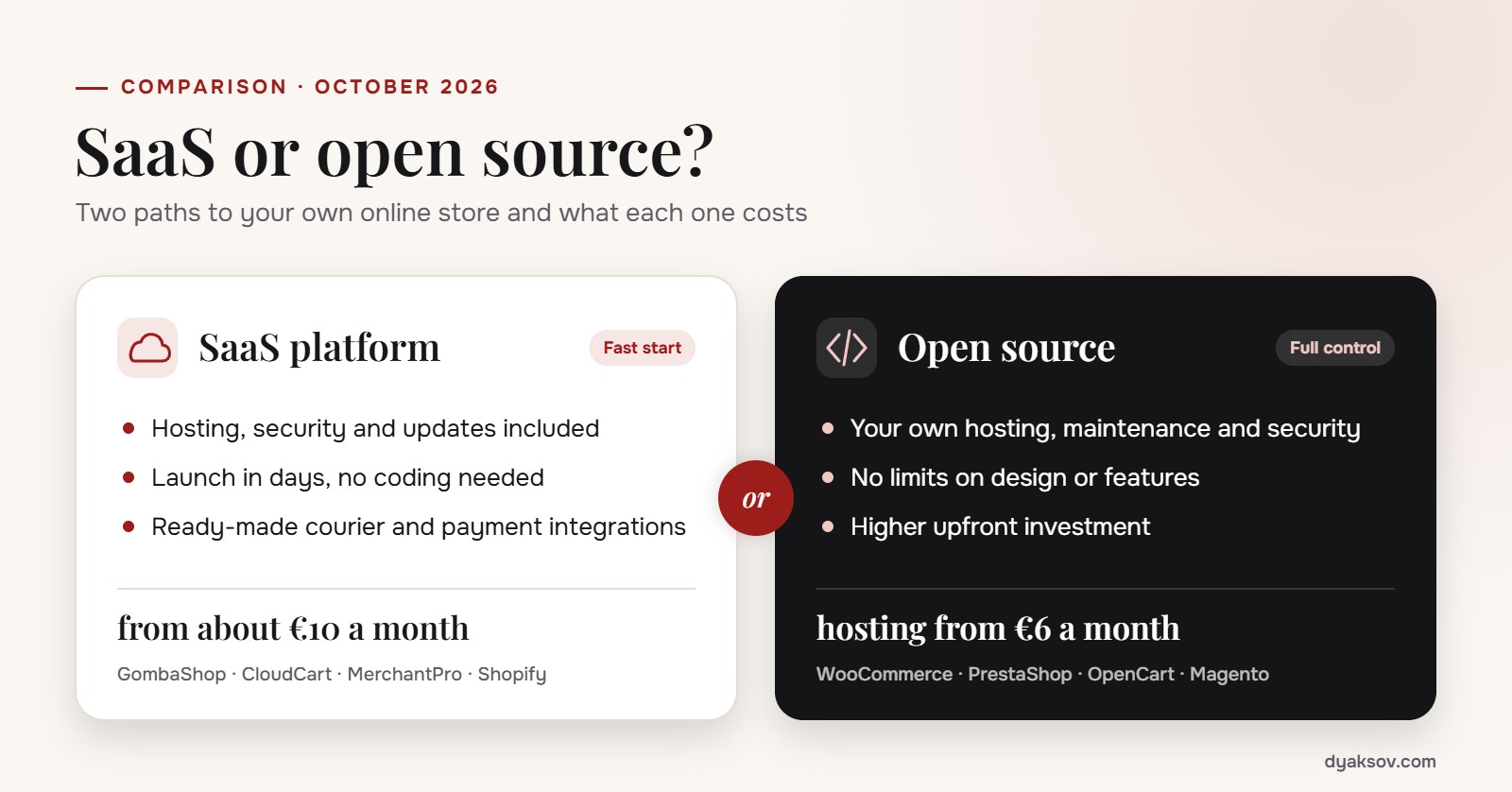
SaaS platforms are subscription services: hosting, security and maintenance all come with the monthly fee. Open-source platforms take more technical work, but they give you more flexibility.
Here’s how the two stack up:
SaaS (Software as a Service)
- No installation or technical skills required.
- Everything is included: hosting, security, updates, support.
- Customization and integrations are usually more limited.
- A good fit for small and midsize businesses that want to launch quickly and safely.
- A good way to test and validate an online business, a product or a product line.
- Examples: Shopify, GombaShop.
Open source
- Requires technical know-how, your own hosting and regular maintenance.
- No limits: you can customize every corner of your store.
- Lower monthly costs, but higher upfront costs.
- A good fit for businesses with specific needs or higher sales volume.
- Examples: WooCommerce, OpenCart, Magento, PrestaShop. PrestaShop 9 arrived in 2025 with better performance and a new API, and WooCommerce remains the most widely used option on WordPress.
If you don’t have a team or technical know-how, SaaS platforms are the safer choice. If you need unique features and flexibility, open source is the way to go.
WooCommerce, Shopify, GombaShop or something else? What to choose based on your goals
There’s no universal “best platform.” There’s only the one that fits your needs best.
Here’s how to think about it:
- Want a fast local option built for the Bulgarian market and its regulations?
GombaShop gives you exactly that: a quick, all-inclusive start, local integrations included, at a very affordable price. - Building a store for international markets?
Shopify will save you time and headaches. You get a secure environment, easy setup and good-looking templates, plus a rich set of tools and integrations. - Want control, strong SEO and an open-source foundation?
OpenCart is free, flexible and backed by a large ecosystem of plugins and themes. But you’ll need either the know-how yourself or a technical partner. - Planning a large store with thousands of products and a team behind it?
Magento (Adobe Commerce) is built for you. It lets you customize every last detail, but it also demands the most in resources and people. - Want to launch a store with just one product or a handful?
Then WooCommerce on WordPress is your answer.
Tip
Define your needs, budget, team and timeline first. Then pick the platform. Not the other way around.
What features should a good e-commerce platform offer?
It should cover more than the “e-commerce basics.” It should also give you room to grow and adapt to the market. A good system keeps working for you even when you’re away from the screen.
At a minimum, you need:
- Easy product catalog management: importing, grouping, filtering and SEO for every page;
- Payment integrations: card payments, cash on delivery, PayPal, Stripe or local solutions;
- Courier integrations: automatic shipping calculation, tracking and notifications;
- Flexible design and a mobile version: most people shop on their phones;
- Multiple languages and currencies: especially important if you plan to sell outside Bulgaria;
- Marketing features: discounts, coupon codes, campaigns, pop-ups, remarketing pixels;
- SEO capabilities: meta tags, URL editing, automatic sitemaps, redirects;
- Tools for analyzing and tracking customer behavior.
And finally, extensibility and customization. Without them, your store will hit a ceiling.
Tip
Choose a platform that lets you start fast and add features as you go.
What will it really cost?
Launching an online store costs more than the monthly subscription or the initial investment. The real price tag includes hosting, maintenance, updates, design, extensions and marketing.
SaaS platforms (subscription)
- Subscription: from about €10 to €100+ per month on annual billing (excluding VAT). Monthly billing is usually 15% to 50% more expensive;
- Everything included: hosting, technical support, SSL certificate, updates;
- Limited design options, or extra fees for templates and integrations.
Open source
- Hosting costs: €6 to €30 per month;
- Initial development and setup: anywhere from a few hundred to tens of thousands of euros, depending on the size and complexity of the store;
- Extensions and plugins: often paid;
- You handle maintenance and security yourself.
And don’t forget the hidden costs: time, training, marketing, and software for inventory or shipping management, plus card processing fees, which are charged on top of the subscription.
E-commerce platform comparison table (October 2026)
Here’s how the most popular platforms in Bulgaria compare side by side. Prices exclude VAT, are current as of October 2026 and can change, so always check the latest offer on the platform’s website.
| Platform | Type | Price from | Fee on sales | Best for |
|---|---|---|---|---|
| GombaShop | SaaS, Bulgarian | €9.60/mo on annual billing (€19.28 monthly) | 0% | a fast, low-cost start; small and midsize stores |
| CloudCart | SaaS, Bulgarian | €14/mo on annual billing (€19 monthly) | 0% | growing stores that need many integrations |
| MerchantPro | SaaS | free plan up to 50 products; paid from €29.74/mo | 0% | testing an idea, B2B and growing stores |
| Seliton | license + monthly fee | one-time license plus a fee from €35/mo | 0% | stores that want more control and custom setup |
| Shopify | SaaS, international | €24/mo on annual billing (€32 monthly) | 0% with Shopify Payments, 0.6% to 2% with a third-party payment provider | selling to international markets |
| WooCommerce | open source (WordPress) | free software + hosting from €6 to €30/mo | 0% | content, SEO and full control |
| OpenCart / PrestaShop | open source | free software + hosting and development | 0% | specific needs and an in-house technical partner |
| Adobe Commerce (Magento) | enterprise / open source | custom quote; the Open Source edition is free | negotiable | large catalogs, many markets and an in-house team |
The table shows the lowest paid plan of each platform. Card processing fees from your bank or payment provider apply separately with every option.
Your platform doesn’t have to be cheap. It has to be the right fit. The cheap option often costs more in the end: once you outgrow it, you may have to start from scratch.
What you need to know about hosting, security and maintenance
Hosting is your store’s home. Security is its lock. Maintenance is your insurance.
With SaaS, hosting is included. You don’t have to think about servers, backups or updates, because the platform handles all of it. That means less stress and more time for your business.
With open-source platforms (WooCommerce, Magento, OpenCart), all of this is on you:
- Your own hosting: stable, fast and with PHP/MySQL support
- Security: SSL certificates, DDoS protection, a backup plan
- Updates: for the core, themes and plugins
- Technical support: if something breaks, you have to fix it (or pay someone who can)
Site problems cost you customers and revenue. Reliable hosting and support aren’t a luxury. They’re a necessity.

What changed in 2025 and 2026?
The core principles of choosing a platform haven’t changed, but a few developments directly affect every online store in Bulgaria:
- The euro. Since 1 January 2026, prices, invoices and subscriptions are in euros, and the dual price display period ended on 8 August 2026. Make sure your platform handles euros correctly in the catalog, cart, documents and courier and accounting integrations.
- Accessibility. Since 28 June 2025, the European Accessibility Act requires online stores to be usable by people with disabilities (contrast, screen readers, keyboard navigation). Microenterprises are exempt, but an accessible store sells better to everyone.
- Tax authority rules. Check whether the platform supports the requirements of Bulgaria’s Ordinance N-18, such as generating an audit file, especially if you accept cash on delivery.
- AI. More and more platforms build in AI for product descriptions, translations, images and analytics. It saves hours of work, but it doesn’t replace a well-thought-out strategy and original content.
- Payments. Shopify Payments now works in Bulgaria, and Bulgarian platforms keep expanding their integrations with payment providers, couriers and marketplaces.
How to make a final choice you won’t regret six months later
Choose a platform that meets your needs today and gives you room to grow. Don’t decide on price or popularity alone. Look at practicality, flexibility and how easy it will be for your team to use.
Ask yourself these questions:
- Will I sell only in Bulgaria, or abroad too?
- Do I have the technical know-how, or a partner who can help?
- Will I need a custom design, or are ready-made templates enough?
- How often will I update my product catalog?
- Do I want to handle maintenance myself, or would I rather have it all “included”?
Answer these questions honestly, and the right platform will become clear.
Don’t go looking for the “perfect” system. It doesn’t exist. But there are platforms that will adapt to your business, save you time and give you the confidence to move.
Your platform is your first technical decision, and its job is to stay out of the way so you can focus on bigger problems. If setting it up takes more effort than actually selling, it’s the wrong choice. If it sounds great on paper but in practice slows you down, complicates things and holds you back, it’s probably not for you.
The goal isn’t to find the “perfect system.” It’s to find the one that lets you move forward calmly, without friction. Your platform won’t solve everything. It just shouldn’t stand between you and where you’re headed.
Petar Dyaksov
Entrepreneur, investor and managing partner at SEOMAX, with more than 15 years of experience in e-commerce and digital marketing. He builds businesses in technology and e-commerce, invests in companies and supports entrepreneurs. Speaker, trainer and mentor at dozens of conferences, seminars and entrepreneurship programmes.
More about me